Thursday, April 10, 2014

Netbackup Oracle backup Error 6 On HP-UX Client

One of our Oracle DB backups were failing with error 6 which is a generic error for DB backups using Netbackup and from the error log i have found


Errors in file /OraBase/admin/Test50/bdump/Test50_j000_29761.trc:

ORA-12012: error on auto execute of job 661138


ORA-00257: archiver error. Connect internal only, until freed.


Error:- ORA-00257: archiver error. Connect internal only, until freed.

Solution:- 

And i see this is moreover Oracle Side to troubleshoot rather the Netbackup side and after a small research i have found the solution is to move some of the archive logs 


--> find the location of Archive destination by
 show parameter archive_dest
 
 lets say it provide  LOCATION=/Test50/oradata/mydb/arch
-->  move some files to some other location using os command
 cd /Test50/oradata/mydb/arch
 mv /Test50/oradata/mydb/arch/* /Test5/oradata/mydb/arch-bkp/
 
If you want to do it from RMAN , try as below.

rman target /

RMAN> backup archive log all format '/Test50/oradata/mydb/arch-bkp';

RMAN> delete archive until time 'trunc(sysdate)';


Error:- ORA-12012: error on auto execute of job 7863452


Solution:- 

The underlying table required as part of one of the schedule maintenance tasks has invalid values. 
The related table is Test50.Testing_Base. 

After taking a look at the job log we see the failed execution attempts:

SQL> select log_date,status from dba_scheduler_job_run_details 
     where job_name='Test50_DBTesting_JOB';

LOG_DATE                              STATUS
------------------------------------- ------------------------------
11-FEB-14 10.00.07.3668 AM -06:00    FAILED
04-FEB-14 08.00.05.59665 AM -06:00   FAILED


2 rows selected.

Solution

Check the invalid values on the table and remove them.

SQL> select * from Test50.Testing_Base;

      DBID INSTANCE_NAME    BASELINE_ID BSLN_GUID                        TI A STATUS           LAST_COMPUT
---------- ---------------- ----------- -------------------------------- -- - ---------------- -----------
4056791929  orcl                       0 24T6YH78JNSHDT89ONSNS09Q2NND8728 NW N ACTIVE           140917:2200
4052355478  ORCL3                      0 12MDNSIdGAJKW474IETJBESGJH539930 ND Y ACTIVE           141022:2000


As we can see the above orcl is corrupted , Now we proceed to delete it.


The corrupt row can be removed as below.


SQL> DELETE FROM Test50.Testing_Base WHERE INSTANCE_NAME ='orcl';

1 row deleted.

SQL> commit;

Commit complete.

Manually re-execute the job and check the execution log, it must show the job executed successfully.  It takes a couple of minutes after execution to show the results in the log table.

SQL> exec dbms_scheduler.run_job('Test50.Testing_Base',false);
PL/SQL procedure successfully completed.


The issue was fixed, validate it by querying

SQL> select log_date,status from dba_scheduler_job_run_details 
     where job_name='Test50.Testing_Base';

LOG_DATE                              STATUS
------------------------------------- ------------------------------
14-FEB-14 11.00.07.315077 AM -06:30   FAILED
15-FEB-14 11.00.05.595559 AM -06:30   FAILED
17-FEB-14 03.41.20.714453 Am -06:30   SUCCEEDED


Now try re-run the job it should be successful :)


Thursday, February 27, 2014

Netapp Volume DataMotion Highlights

Today i have performed Netapp DataMotion for volumes to migrate volumes from One Aggregate to another aggregate and i can see DataMotion uses SNAPMIRROR in the back end to move the data from OLD VOLUME to the NEW VOLUME. Please find the brief summary below how it works...

Note :- My volumes has ORACLE DB running on them and i have seen no disruption to the application during DataMotion it went smooth and Hassle Free.

prodfiler4> vol move start production_vol_adm ataggr0 -k

Use " -k " option if you want to keep the source volume as once after the VOL MOVE , Netapp destroys the source volume as all the new reads and writes were directed to the New Volume ( Destination Volume)

prodfiler4> Wed Feb 26 16:14:50 SGT [prodfiler4:vol.move.Start:info]: Move of volume production_vol_adm to aggr ataggr0 started
Creation of volume 'ndm_dstvol_1393402490' with size 21474836480  on containing aggregate
'ataggr0' has completed.

Volume 'ndm_dstvol_1393402490' is now restricted.

Wed Feb 26 16:15:13 SGT [prodfiler4:vol.move.transferStart:info]: Baseline transfer from volume production_vol_adm to ndm_dstvol_1393402490 started.
Transfer started.

Monitor progress with 'snapmirror status' or the snapmirror log.

Wed Feb 26 16:16:54 SGT prodfiler4:vol.move.transferStatus:info]: Baseline transfer from volume production_vol_adm to ndm_dstvol_1393402490 took 97 secs and transferred 1935528 KB data.

Wed Feb 26 16:16:56 SGT [prodfiler4:vol.move.transferStart:info]: Update from volume production_vol_adm to ndm_dstvol_1393402490 started.
Transfer started.

Monitor progress with 'snapmirror status' or the snapmirror log.

Wed Feb 26 16:17:18 SGT [prodfiler4:vol.move.transferStatus:info]: Update from volume production_vol_adm to ndm_dstvol_1393402490 took 13 secs and transferred 1160 KB data.

Wed Feb 26 16:17:23 SGT [prodfiler4:vol.move.transferStart:info]: Update from volume production_vol_adm to ndm_dstvol_1393402490 started.
Transfer started.

Monitor progress with 'snapmirror status' or the snapmirror log.

Wed Feb 26 16:17:44 SGT [prodfiler4:vol.move.transferStatus:info]: Update from volume production_vol_adm to ndm_dstvol_1393402490 took 12 secs and transferred 1104 KB data.

Wed Feb 26 16:17:44 SGT [prodfiler4:vol.move.updateTimePrediction:info]: Expected time for next update from volume production_vol_adm to ndm_dstvol_1393402490 is 12 secs to transfer 272 KB data.

Wed Feb 26 16:17:52 SGT [prodfiler4:vol.move.cutoverStart:info]: Cutover started for vol move of volume production_vol_adm to aggr ataggr0.
Transfer started.

Monitor progress with 'snapmirror status' or the snapmirror log.

prodfiler4> vol move status production_vol_adm
Source                Destination                     CO Attempts    CO Time     State
production_vol_adm    ataggr0                         3              60          cutover

prodfiler4> Wed Feb 26 16:18:07 SGT [prodfiler4:vol.move.cutoverEnd:info]: Cutover finished for vol move of volume production_vol_adm to aggregate ataggr0 - time taken 14 secs

prodfiler4> vol move status production_vol_adm
Source                Destination                     CO Attempts    CO Time     State
production_vol_adm    ataggr0                         3              60          cutover

prodfiler4> Wed Feb 26 16:18:16 SGT [prodfiler4:wafl.vvol.renamed:info]: Volume 'ndm_dstvol_1393402490' renamed to 'production_vol_adm_old_1393402490'.
'ndm_dstvol_1393402490' renamed to 'production_vol_adm_old_1393402490'
Wed Feb 26 16:18:17 SGT [prodfiler4:vol.move.End:info]: Successfully completed move of volume production_vol_adm to aggr ataggr0.


I have observed one important thing during the DataMotion is that you SOURCE VOLUME should have atleast 10% of FREE_SPACE left in it if not you may face issue during cut_over time as once after the base transfer it creates a snapshot on the Source Volume and do the updates based on the snapshot if you don't have enough space to create snapshots it will just show you transferring updates for more than 5 times which means you have to abort the DataMotion and increase the SOURCE VOLUME size and then start over again.

One more Important thing is the snap autodelete commitment settings on the volume should be set to Try 

Ex:- snap autodelete production_vol_adm commitment try ( Set this before initiating DataMotion )

Wednesday, February 26, 2014

"Netapp" How to Convert a 32-Bit Aggregate in to a 64-Bit

Starting from Ontap 8.1 if you want to convert an aggregate of 32-bit to 64-bit all you need is add disks to grow the aggregate over 16TB and it will automatically convert in to 64-bit and it happens in the background (no downtime required ) from 32 to 64 bit.  Growing over 16TB is the safest method.

Example :- 

For example if you have 14 disks in a 32-Bit aggregate and then you may need to add additional 2 more disks to make it 64 Bit

Syntax:- 

Nayab >  aggr add aggr_name -64bit -upgrade normal -n 2

This will add 2 disks to the aggregate at the same time it will convert your aggregate to 64-Bit 


If you are not able to add disks then there is another alternative can do it through the Diag Mode ( But it is very risky to perform unless directed by a Netapp Personal )

It is your own risk If you want to try this method :-

Nayab > priv set diag 

Nayab *> aggr 64bit-upgrade start aggr1 -mode grow-all

Thursday, December 19, 2013

How to change DB instance job schedule for Netapp Snapmanager for SQL Server Busy message

Hi All We have been facing issue with one of our SQL DB instance which is backed up through SNAPMANAGER has been failing with status Snapmanager Server Busy.... So what i have thought is if i change the schedule where no other instances were getting backed up ..... It is always good to have atleast 30mins-1hr between each instance. Please take note that SnapManager for SQL will not follow the windows  task scheduler ( Snapmanager for Exchnage uses windows Task Scheduler ). All i have done to avoid the server busy message is to change the schedule as below and it worked perfectly. Now my backups are successful.

Open SQL Server  Management Studio


Select the DB Instance for which you want to change the SCHEDULE


Now go to SQL Server Agent àDB_Schedule_Nameà Properties

 Select the Job and click Edit


Now you will be able to check and change the scheduled time to run the snapmanager for SQL

Sunday, November 24, 2013

Netbackup Error 830,96,252........ Due to Tape Library IBM 3500 Gripper Failure

We have our backups failing with errors 830, 96, 252, etc... Note that we are using Symantec Netbackup. I was not able to find the cause first thinking it was drives errors as our library was not serviced since years. Later my lead suspected beyond the drive errors then he found the hardware issue.


Gripper probably has a tape stuck in it. I have opened the door and turn the robot towards me so i can see if there are tapes inside and i have discovered a tape was stuck inside the gripper then there's a small mechanism on it, like a plastic rope that you can move with your finger. Pushing it back allows you to get the tape from the gripper. As after removing the tape from the gripper still it didn’t solve my issue then later the IBM engineer came down to our site and replaced the two grippers as they both went faulty. Now my backups are just running fine.
You can find the faulty Gripper in the below pics.


Thursday, October 31, 2013

Netbackup Oracle DB backup failing with error 6

Today we have faced a backup failure of a Oracle DB and later was able to fix the issue following the steps below.

Error
--------
RMAN-00554: initialization of internal recovery manager package failed
RMAN-04004: error from recovery catalog database: ORA-12516: =
TNS:listener could not find available handler with matching protocol =
stack
------
ERROR : ORA-12516: TNS:listener could not find available handler with matching protocol stack

CAUSE : One of the most common reasons for the TNS-12516 and/or TNS-12519 errors being reported is the configured maximum number of PROCESSES and/or SESSIONS limitation being reached. When this occurs, the service handlers for the TNS listener become "Blocked" and no new connections can be made.

SOLUTION :
----------------
1.Check maximum value for processes and sessions using below command :
select name, value from v$parameter where name in (‘processes’,'sessions’);

2.Check current process and session and maximum limitation using below command :
select * from v$resource_limit;

3. Increase your process and session, for example to 300 using below command :
alter system set processes=300 scope=spfile;
alter system set sessions=300 scope=spfile;

4. You need to restart database to take effect.

Tuesday, October 29, 2013

Netapp Additional Information from the version 7.3.1.1 onwards

Right from Data ONTAP 7.3.1.1 additional information was added to the sysconfig command for the Storage Configuration.


Possible System Storage Configurations:

Single-Path          All storage in system is single-pathed
Mixed-Path          Some storage is single-pathed, some is multi-pathed
Multi-Path             All storage in system is multi-pathed
Single-Path HA   All storage in this system is single-pathed
Mixed-Path HA    Some storage is single-pathed, some is multi-pathed
Multi-Path HA      All storage is multi-pathed

Ex:-  FAS01> sysconfig
NetApp Release 8.1.1 7-Mode:
System ID: 80093278468 (FAS01); partner ID: 80090494093(FAS02)
System Serial Number: 4000201034 (test1)
System Rev: F6
System Storage Configuration:  Multi-Path HA

Monday, October 28, 2013

Ease your daily work with Netapp's new work flow automation (WFA)

OnCommand Workflow Automation (WFA) is a software solution that helps to automate storage
management tasks such as provisioning, migration, decommissioning, and cloning storage. You can
use WFA to build workflows to complete tasks specified by your processes.
A workflow is a repetitive and procedural task that consists of sequential steps, including the
following types of tasks:

• Provisioning, migrating, or decommissioning storage for databases or file systems
• Setting up a new virtualization environment, including storage switches and datastores
• Setting up storage for an application as part of an end-to-end orchestration process
Storage architects can define workflows to follow best practices and meet organizational
requirements, such as the following:
• Using required naming conventions
• Setting unique options for storage objects
• Selecting resources
• Integrating internal configuration management database (CMDB) and ticketing applications

WFA features

WFA includes the following features:
• Designer portal to build workflows
The designer portal includes several building blocks such as commands, templates, finders,
filters, and functions that are used to create workflows. The designer enables workflows to
include advanced capabilities such as automated resource selection, row repetition (looping), and approval points.
• Execution portal to execute workflows, verify status of workflow execution, and access logs
• Administration portal for tasks such as setting up WFA, connecting to data sources, and
configuring user credentials
• Web services interfaces to invoke workflows from external portals and data center orchestration software.

Also Refer to :- 
https://communities.netapp.com/community/products_and_solutions/storage_management_software/workflow-automation

Netapp Performance Limits to achieve better performance

To Achieve better performance Please make sure your filer was under the below threshold limits               

Filer Threshold                                                                                                                             


Volume Threshold                                                                                                                      


      Protocol Latency limits


Exchange Server Thresholds                                                                                                      
                                                                               

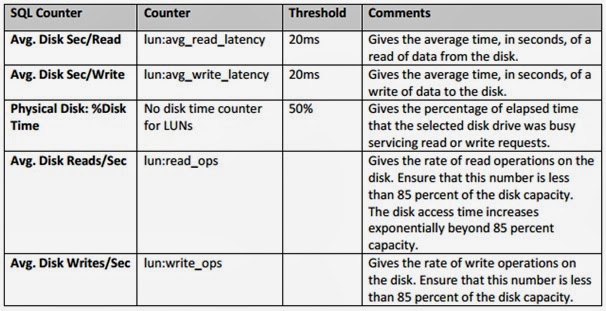
SQL Threshold Values                                                                                                                 


      ORACLE Threshold values


Monday, September 2, 2013

Netbackup Error 6 for SAP DB backup

My backups were failing with error 6 I got below error in the logs as
SAP_SCHEDULED = 1
SAP_USER_INITIATED = 0
SAP_SERVER = XXXX
SAP_POLICY = SAP-XXXX
SAP_FULL = 1
SAP_CINC = 0
ERR
-24985,ERR_MENOTFOUND: medium not found
Execution of DBMCLI command failed - exiting
 Note that the error log location will be UNIX:-  /usr/openv/netbackup/logs/bphdb
                                              WINDOWS :-  C:\Program Files\Veritas\NetBackup\logs\bphdb
  

Solution:-

-24985: ERR_MENOTFOUND - medium not found

Explanation
You specified a backup template that is not defined.
User Response
  • Check whether you entered the name of the backup template correctly.
  • Use a different backup template.
  • Create a new backup template with this name.
  • If you cannot resolve the error, contact Support.